
Team on the road
See when each person in your team started and ended their day, what their odometer read, roughly how far they travelled, where they were last seen, and the stops they made.
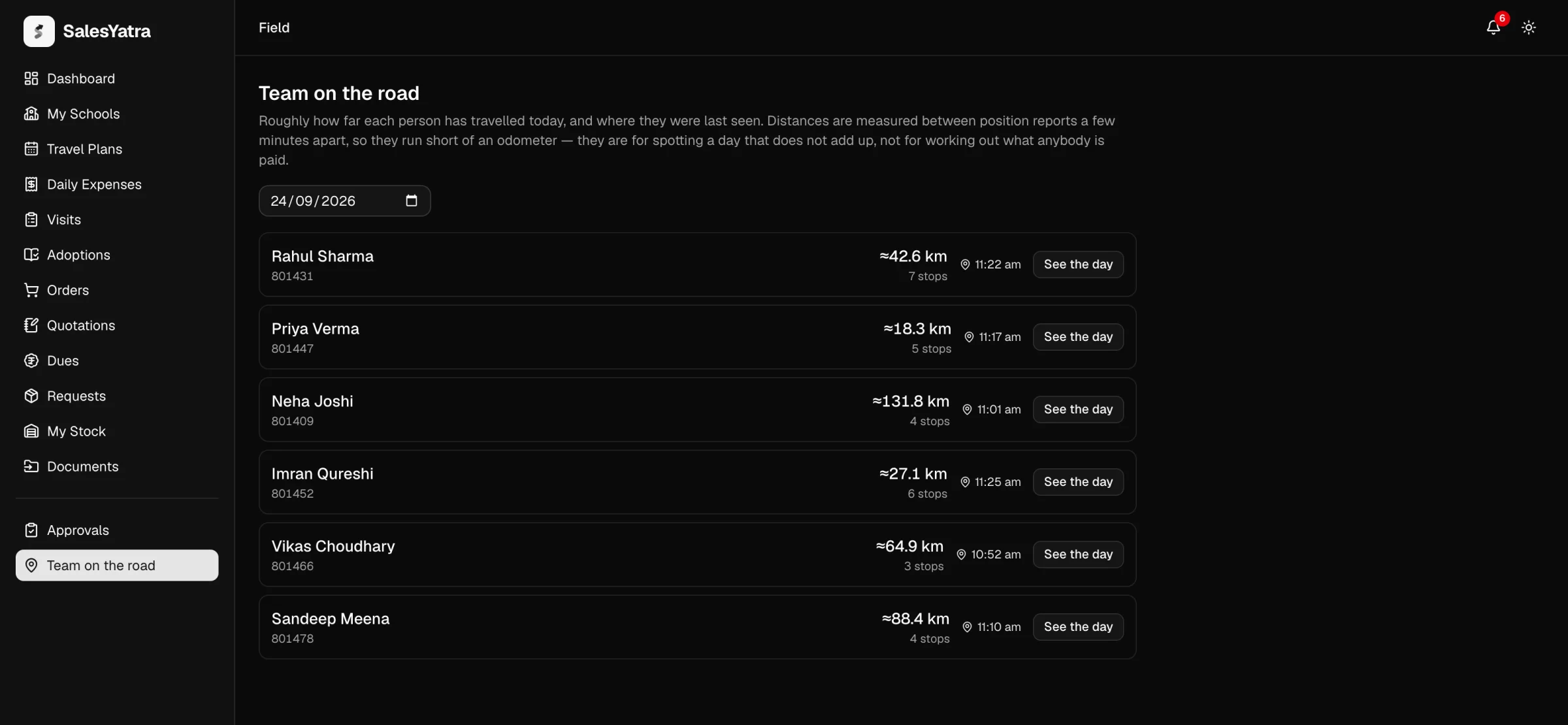
/field/trackingTeam on the road answers the question you ask before ringing a rep: where are they now, and how has their day gone? For everyone who reports to you, it shows when they started and ended their day on the app, how far their odometer says they went, roughly how far the phone says they travelled, how many places they've stopped, and where they were last seen.
Who's on the list
Team on the road is in the sidebar for the Area Sales Manager (ASM), Deputy General Manager (DGM), National Sales Head (NSH), Chief Executive Officer (CEO) and Administrator.
- Managers see everyone who reports to them, directly or through someone else. You aren't on your own list.
- Administrators see every employee.
- Only active employees are listed. Someone who has been deactivated drops off.
If nobody reports to you yet, the page says so.
Read the list
Each person's row shows:
| What you see | What it means |
|---|---|
| Name and employee code | Who it is. |
| The day's hours, such as 9:00 am – 6:30 pm | When they started and ended their day on the app, with ended, closed on its own or under way under it, and no vehicle for a day without one. Day not started means they haven't started one, so they can't check in anywhere that day. See Start and end your day. |
| Odometer distance, such as 51.5 km | The closing reading less the morning's. Only on a day they ended themselves with a vehicle: a day that closed on its own has no closing reading. |
| GPS distance, such as ≈42.6 km | Roughly how far the phone's location readings say they've travelled on the day shown. Marked by GPS when the odometer figure is there too. |
| Stops | How many places they stopped, or "no stops recorded". |
| Last seen | Where they were last seen, as a time. Select it to open that position in Google Maps. |
| See the day | Their stops in order, with times. |
The last-seen spot on each row tells three situations apart, because you'd act differently on each:
| What it shows | Why |
|---|---|
| A time, with a pin | The phone reported in the last 15 minutes. Select the time to see the place in Google Maps. |
| no recent report | The phone hasn't reported in the last 15 minutes. The app may be closed, the phone may have no signal, or location may not be allowed. |
| —, with a badge reading Outside working hours | It's outside the working day, so nobody's current position is shown. The badge gives the hours. |
While you're looking at today, the list refreshes itself every minute.
Look at another day
Change the date in the box above the list. The distances and stops change to that day. The last-seen time always means the last 15 minutes, whichever day you pick.
See one person's day
Open their day
Select See the day on their row. The window is titled with their name and the date.
Read the stops
It gives the approximate distance and the number of stops, then lists the stops in order, lettered A, B, C. Each has a time range, from the first reading there to the last, and its position, which opens in Google Maps.
Above the stops is the day from the app: when it started, with the morning's odometer reading and its photo, and when it ended, with the closing reading and its photo, and the kilometres between them. Select a photo to open it full size. A day with no vehicle says No vehicle today, and one that closed on its own says No closing reading. If no day was started on that date, the window says so.
When the day has a claim for the rep's own vehicle, a line under it puts the claim beside the work, such as "62 km claimed for the vehicle; the day's 4 check-ins explain about 58.1 km by road". A drive the day doesn't account for is Flagged for a look, with the reason. See Flagged drives.
If the phone reported nothing that day, the window says so. There's no map drawn inside SalesYatra: each stop links out to Google Maps instead.
How the distance and stops are worked out
- Readings. From the moment a rep starts their day on the SalesYatra Android app until it ends, while the app is open on their screen, it takes a position reading every 3 minutes.
- Distance. The distance adds up the straight lines between one reading and the next. Steps shorter than 50 metres are ignored, because a phone standing still wanders by that much. Jumps longer than 100 km are ignored too, because they mean the phone was off between two places, not a journey.
- Stops. A stop is a run of readings within 250 metres of each other: the rep arrived, stayed a while, and moved on.
Because it's straight lines between readings a few minutes apart, the figure runs short of a car's odometer and can't match one. Where a day has both readings, compare the two: a GPS figure far above the odometer's, or an odometer figure far above anything the phone saw, is a day to ask about.
Use the GPS distance to spot a day that doesn't add up, such as a large travel claim against a phone that barely moved. It is never used to work out what anyone is paid. The odometer distance is: a day ended with both readings files them as a Personal vehicle claim on Daily Expenses, marked Mobile.
Where the positions come from
- Only from the Android app, only during the rep's day, and only while it's on the screen. Nothing is read before the rep starts their day or after it ends. Readings stop when the rep switches to another app, locks the phone or closes the app, and start again when they come back. There's no background collection.
- Only with the location permission the rep already gave for check-ins. The app never asks for location by itself, so if the rep hasn't allowed it, no readings are taken.
- Never from the web portal. A visit logged on the portal carries no position.
How this looks from the rep's side is on Location.
Privacy
- Working hours limit what's shown live, not what's recorded. Administrators set the working day under Admin panel → Settings → Working hours (see Settings). Outside those hours, nobody's current position is shown. The app still takes readings whenever it's open during the rep's day, at any hour, and See the day shows those stops for any day.
- Who can see it. A rep's location history is shown to the managers above them in their reporting line and to administrators. Colleagues at the same level, the accounts desk and the warehouse don't see it.
- How long it's kept. It's kept as a business record, like visits. Nothing deletes it automatically.
The full wording is in SalesYatra's privacy policy at salesyatra.com/privacy.
Good to know
- Assistant Territory Managers and reps don't have this screen. If one of them opens it, the page says it's for managers.
- Team on the road is on the web portal only.
- If the list won't load, the page says so and offers Try again. That's different from an empty team.
Related
Last updated on
Approvals
Decide on everything your team sends up to you, from orders to stock and sampling requests and travel plans.
Dispatch
Pack the orders and requests handed to you, record each consignment and the firm that invoices it, attach the bilty when the transporter sends it, track books still owed, and take returns back.