
Dues
See what each of your schools owes, which bills are overdue, and open the invoice behind each one.
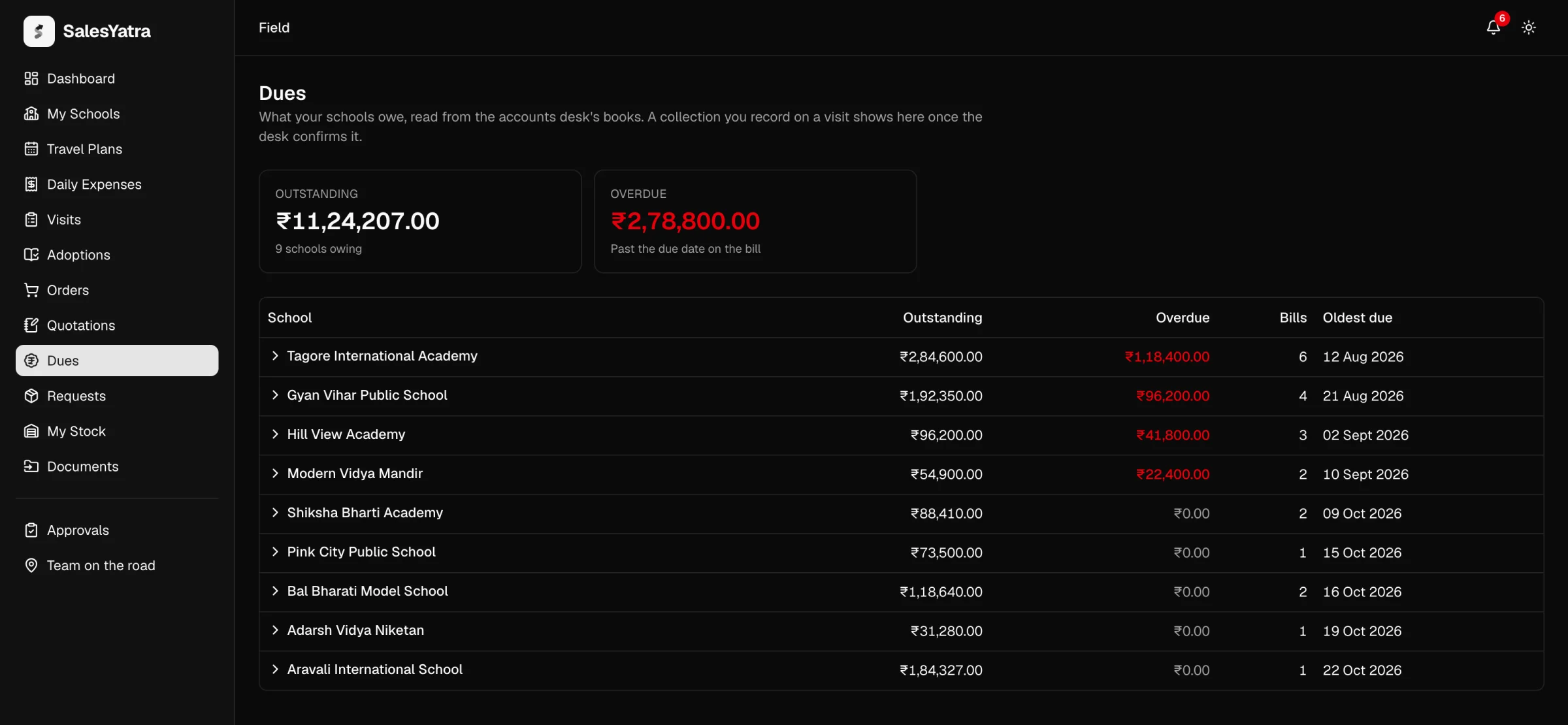
/field/duesDues shows what the schools on your patch owe, read straight from the accounts desk's books. Schools are sorted by how much is overdue, so the top of the list is where to go next.
The page only reads. You collect the money and the desk records it, so nothing you do here changes a balance.
Whose schools you see
| You are | Dues shows |
|---|---|
| A sales executive or Assistant Territory Manager (ATM) | The schools you are accountable for, as owner or as "also accountable". |
| A manager (Area Sales Manager and above) | Your own schools and those of everyone in your reporting line below you. |
| An Administrator | Every school. |
Only bills made out to the school itself appear. An order billed to a dealer is the dealer's bill, and dealers aren't on anybody's patch, so it doesn't show here.
Read the totals
The two cards at the top add up every school on the list:
- Outstanding is everything still owed, with the number of schools owing.
- Overdue is the part that is past the due date on the bill. It shows in red when there is any.
Read the list
| Column | What it shows |
|---|---|
| School | The school. Select it to open its bills. |
| Outstanding | Everything the school still owes, across both firms. |
| Overdue | The part of that past its due date, in red. |
| Bills | How many bills are still open. |
| Oldest due | The earliest due date among those bills. |
Schools with the most overdue come first, then those that owe the most. When nobody owes anything, the list reads "Nothing owed by your schools."
Open a school's bills
Select a school's name. The row opens to show:
- One box per firm it owes, with the firm's name, what it owes and how much of that is overdue. If the school has paid a firm in advance and the money isn't yet set against a bill, the box says so.
- Last payment received: the amount, date, how it was paid and the receipt number. If none has been recorded yet, it says so.
- The open bills, oldest first, each with its Bill number and firm, Date, Due, Outstanding, an OVERDUE badge when it is past due, and a PDF link to the invoice.
A balance carried over from the company's earlier books appears as "Opening balance" and has no PDF, because there is no document behind it. At most the oldest 50 bills are listed. A school with more says "Showing the oldest 50 of …".
Dues has no WhatsApp button. For an invoice raised from an order, the order's invoice page has one. See Invoices.
When a bill falls due
Each invoice gets a due date when it is raised: the invoice date plus the credit days in its payment terms. Orders raised on the portal carry 30 days' credit. A bill counts as overdue from the day after its due date, by India's calendar.
Overdue alerts
When an invoice on a school you own goes overdue, you are told once for that invoice:
- In the bell. An "Overdue invoice" notification naming the invoice, the amount, the party and the date it was due. It links to Dues. See Notifications.
- By email. A message with a subject like "2 bills have gone overdue on your schools", listing each school, invoice, due date and amount outstanding.
The check runs every day at 09:00 India time. It also runs whenever someone opens Dues, the Dues card on the Android app's home screen, or the accounts desk's Home screen, so an alert can arrive earlier in the day.
The alert goes only to the school's accountable executive (owner), not to anyone marked "also accountable" or to managers. The email needs an active login with an email address. Nothing is sent to the school itself: chasing a customer is a conversation you have, not an email the system sends.
Where a collection shows up
When you record money collected on a visit, it is a claim until the accounts desk confirms it into a receipt. Only then does it come off the school's balance here. A cheque you noted is not money in the books until the desk has confirmed it, so a school shown as clear here is clear in the ledger too.
If a school says it has paid but still shows as owing, the payment probably isn't confirmed on the books yet. Ask the accounts desk, which confirms reps' collections under Collections.
Related
Last updated on
Quotations
Send a school a price offer at catalogue prices, share it as a PDF or on WhatsApp, and turn it into a draft order when the school accepts.
Requests
Ask for specimen copies for yourself, samples sent to a school, or a teacher-training workshop, and follow each one through two signatures to the warehouse.