
Home
See what each firm is owed and holds, how this month's sales are going, and what is waiting on the desk.
/accountsHome is the first screen the billing desk and the Accountant see after signing in. It shows what the firms are owed and hold, this month's sales, and the work waiting on the desk. Choose Both firms or one firm in the Showing box at the top right, and the figures follow your choice.
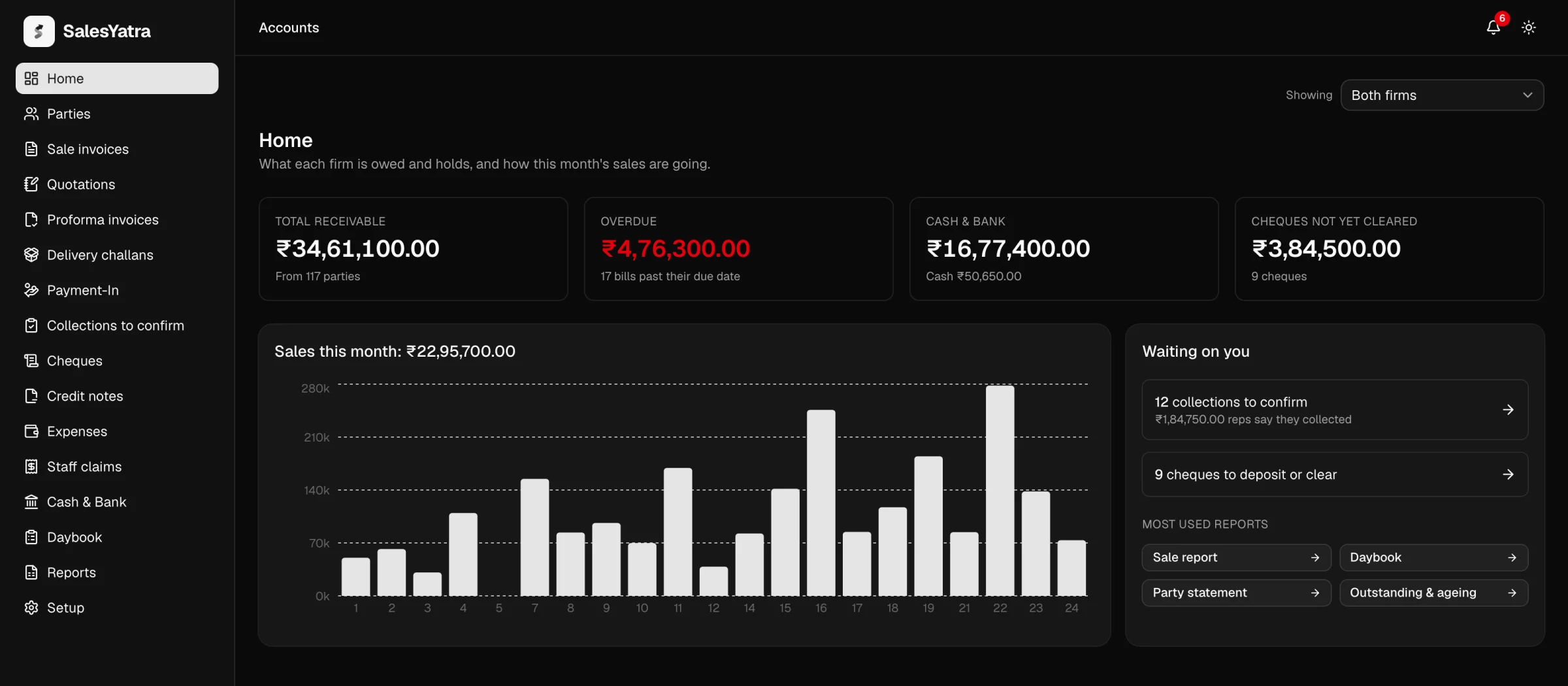
The four totals
| Card | What it adds up | The line underneath |
|---|---|---|
| Total receivable | Everything parties owe the firm, counting only parties whose balance is owed to the firm. | How many parties owe something. |
| Overdue | What is still unpaid on invoices whose due date was before today. It turns red when it is more than nought. | How many bills that is. |
| Cash & bank | The balance of every bank and cash account. Cheques not yet cleared are not included. | The cash-in-hand part of it. |
| Cheques not yet cleared | Cheques and demand drafts received but not yet cleared, whether still in hand or deposited. | How many cheques that is. |
A party that has paid ahead does not reduce Total receivable. Parties shows those advances separately.
A bill counts as overdue from the day after its due date, by India's calendar, so a bill due today joins Overdue tomorrow. The card counts every overdue invoice, whenever it was raised; the current month only sets the sales chart. They are the same bills that carry the OVERDUE badge under Sale invoices and that its Overdue view lists. The ageing report under Reports draws the same line, but it also counts balances brought across from Vyapar, which this card leaves out.
Sales this month
The chart shows each day's invoiced total for the current month, and its heading gives the month's total. It counts invoices that stand in the books. Cancelled invoices are left out, and so are invoices raised during the pilot before the books were kept here. Days with no sales have no bar. Before the first sale of the month, the card says "No sales yet this month."
Waiting on you
The Waiting on you card links to the queues the desk works through:
- collections to confirm: payments reps say they collected on visits, with the total they claim. Open Collections to confirm to turn each one into a payment, or dismiss it.
- returns to credit: books the warehouse took back from schools and trade parties, waiting for a credit note. Open Returns to credit.
- cheques to deposit or clear: open Cheques.
The counts of collections and returns always cover both firms, whichever firm the Showing box has chosen. The cheque count follows the Showing box.
Under Most used reports are four shortcuts:
| Button | Opens |
|---|---|
| Sale report | Sale invoices |
| Daybook | Daybook |
| Party statement | Parties |
| Outstanding & ageing | The ageing report under Reports |
When a firm's details are missing
If a firm has no registered address, GSTIN or phone number yet, Home shows a yellow warning naming what is missing. Every invoice prints these details, so fill them in under Setup → Firms before you bill from that firm. The warning follows the Showing box.
Overdue reminders to reps
Opening Home also sends reps their overdue reminders. SalesYatra looks for invoices still unpaid the day after their due date, the same bills the Overdue card counts, and tells the rep responsible for each school:
- The rep gets a notification in the bell for each bill: how much is still owed, by which school, and the date it was due. It links to their Dues screen.
- The rep also gets one email listing all of those bills.
Each bill is announced only once, however often Home is opened. Reminders also go out every morning at 9:00, and whenever a rep opens Dues. Opening Home is one more way they get sent.
Nothing is ever sent to the school itself. Chasing a customer is a conversation the rep has, not an email the system sends. Bills to trade parties have no rep responsible for them, so nobody is reminded about those.
Related
Last updated on